


Page 240 - Basic Course
P. 240
KNX BASIC COURSE

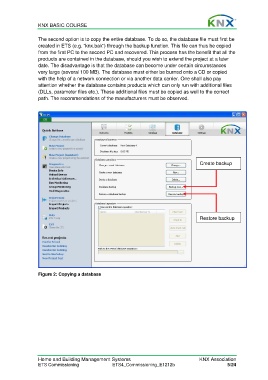
                  The second option is to copy the entire database. To do so, the database file must first be
                  created in ETS (e.g. “knx.bak”) through the backup function. This file can thus be copied
                  from the first PC to the second PC and recovered. This process has the benefit that all the
                  products are contained in the database, should you wish to extend the project at a later
                  date. The disadvantage is that the database can become under certain circumstances
                  very large (several 100 MB). The database must either be burned onto a CD or copied
                  with the help of a network connection or via another data carrier. One shall also pay
                  attention whether the database contains products which can only run with additional files
                  (DLLs, parameter files etc.). These additional files must be copied as well to the correct
                  path. The recommendations of the manufacturers must be observed.


                                                                                          Create backup


                                                                                          Restore backup


                  Figure 2: Copying a database


                  Home and Building Management Systems                                    KNX Association
                  ETS Commissioning                ETS4_Commissioning_E1212b                          5/24

