


Page 263 - Advanced Course
P. 263
KNX ADVANCED COURSE

                  3.1  ETS Apps Concept – Licensing ETS App already contained in ETS
                        software


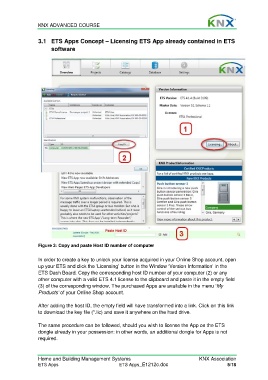
                  Figure 3: Copy and paste Host ID number of computer

                  In order to create a key to unlock your license acquired in your Online Shop account, open
                  up your ETS and click the ‘Licensing’ button in the Window ‘Version Information’ in the
                  ETS Dash Board. Copy the corresponding host ID number of your computer (2) or any
                  other computer with a valid ETS 4.1 license to the clipboard and paste it in the empty field
                  (3) of the corresponding window. The purchased Apps are available in the menu ‘My
                  Products’ of your Online Shop account.

                  After adding the host ID, the empty field will have transformed into a link. Click on this link
                  to download the key file (*.lic) and save it anywhere on the hard drive.

                  The same procedure can be followed, should you wish to license the App on the ETS
                  dongle already in your possession: in other words, an additional dongle for Apps is not
                  required.


                  Home and Building Management Systems                                    KNX Association
                  ETS Apps                            ETS Apps_E1212c.doc                             5/18

