


Page 268 - Advanced Course
P. 268
KNX ADVANCED COURSE


                  4  Examples of ETS Apps


                  4.1  Introduction

                  Underneath only a selection of ETS Apps is described, all of them are Apps offered by
                  KNX Association itself. For more information on available Apps and their functionality,
                  please consult the KNX web site.


                  4.2  Device Reader
                  With the help of the standard ETS, one can easily manipulate parameters in the
                  application software of KNX devices and thus realize the desired functionality. Even at a
                  later stage, these parameters can again be adapted in ETS to new user needs.
                  Situations may however occur where system integrators have to dig deeper into devices.
                  An unknown bus component may for instance unexpectedly surface when reconstructing
                  an existing KNX installation. In such cases, the ETS App Device Reader can be used to
                  directly read out the memory of devices, in this way providing the user with more helpful
                  data and hopefully information that resolves matters at hand.


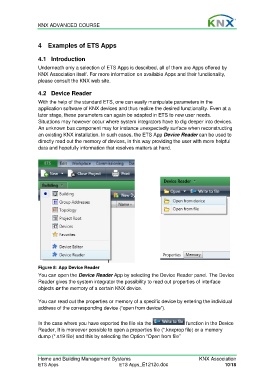
                  Figure 8: App Device Reader
                  You can open the Device Reader App by selecting the Device Reader panel. The Device
                  Reader gives the system integrator the possibility to read out properties of interface
                  objects or the memory of a certain KNX device.

                  You can read out the properties or memory of a specific device by entering the individual
                  address of the corresponding device (“open from device”).

                  In the case where you have exported the file via the              function in the Device
                  Reader, It is moreover possible to open a properties file (*.knxprop file) or a memory
                  dump (*.s19 file) and this by selecting the Option “Open from file”


                  Home and Building Management Systems                                    KNX Association
                  ETS Apps                            ETS Apps_E1212c.doc                            10/18

