


Page 89 - Advanced Course
P. 89
KNX ADVANCED COURSE

                  1  Integrated KNX Applications


                  1.1  Introduction

                  Simple user functions such as manually switching lights and closing/opening shutters as
                  well as simple time parameters are not sufficient in many cases as the customer requests
                  a KNX installation precisely because of the comprehensive range of different functions
                  available with possibilities for integration. Some of these combined user functions are
                  outlined in this chapter.


                  1.2  Scene control

                  The actuator control of individual functions from switching and dimming lights, moving
                  shutters, setting the modes of heating/cooling systems and activating/deactivating an
                  alarm system can be carried out very conveniently using scene control. This is
                  implemented via so-called scene modules or scene controllers. These controllers have
                  two methods of operation:


                  1.2.1  Recalling Scenes
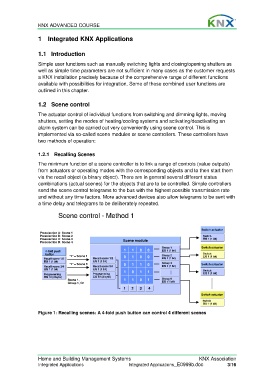
                  The minimum function of a scene controller is to link a range of controls (value outputs)
                  from actuators or operating modes with the corresponding objects and to then start them
                  via the recall object (a binary object). There are in general several different status
                  combinations (actual scenes) for the objects that are to be controlled. Simple controllers
                  send the scene control telegrams to the bus with the highest possible transmission rate
                  and without any time factors. More advanced devices also allow telegrams to be sent with
                  a time delay and telegrams to be deliberately repeated.

                           Scene control - Method 1
                           Scene control - Method 1


                                                                                           Switch actuator
                   Preselection A: Scene 1
                   Preselection B: Scene 2                                                 Switch
                   Preselection C: Scene 3              Scene module                       EIS 1 (1 bit)
                   Preselection D: Scene 4
                                                                         Group 1          Switch actuator
                     4-fold push                        1   1  0   0     EIS 1 (1 bit)
                     button     "1" = Scene 1           0   1  0   0     Group 2           Switch
                                                                                           EIS 1 (1 bit)
                     Recall scene 1/2     Recall scene 1/2               EIS 1 (1 bit)
                     EIS 1 (1 bit)        EIS 1 (1 bit)
                                "1" = Scene 3           0   1  1   0     Group 3          Switch actuator
                     Recall scene 3/4     Recall scene 3/4               EIS 1 (1 bit)
                     EIS 1 (1 bit)        EIS 1 (1 bit)  1  0  1   1                       Switch
                     Programming          Programming                                      EIS 1 (1 bit)
                     EIS 10 (2 byte)      EIS 10 (2 byte)                Group 8
                               Scene 1,                 1   1  0   1
                               Group 1, On                               EIS  (1 bit)
                                                        1  2   3   4
                                                                                          Switch actuator
                                                                                           Switch
                                                                                           EIS 1 (1 bit)
                  Figure 1: Recalling scenes: A 4-fold push button can control 4 different scenes


                  Home and Building Management Systems                                   KNX Association
                  Integrated Applications                 Integrated Applications_E0999b.doc          3/16

