


Page 144 - Computing E-Book Grade 7
P. 144
The City School  2021-2022


             To use Edison, you’re going to need to know where all of Edison’s sensors are
             located and become familiar with the robot’s three buttons.


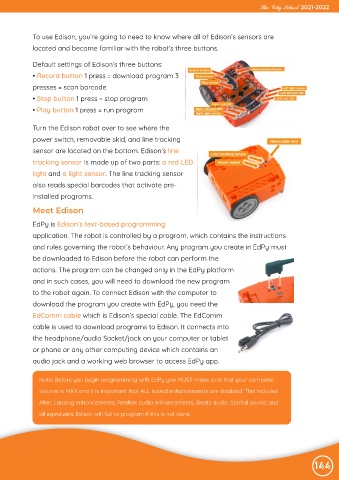
             Default settings of Edison’s three buttons:
             • Record button 1 press = download program 3

             presses = scan barcode
             • Stop button 1 press = stop program

             • Play button 1 press = run program


             Turn the Edison robot over to see where the
             power switch, removable skid, and line tracking

             sensor are located on the bottom. Edison’s line
             tracking sensor is made up of two parts: a red LED

             light and a light sensor. The line tracking sensor
             also reads special barcodes that activate pre-

             installed programs.

             Meet Edison

             EdPy is Edison’s text-based programming
             application. The robot is controlled by a program, which contains the instructions

             and rules governing the robot’s behaviour. Any program you create in EdPy must

             be downloaded to Edison before the robot can perform the
             actions. The program can be changed only in the EdPy platform
             and in such cases, you will need to download the new program

             to the robot again. To connect Edison with the computer to

             download the program you create with EdPy, you need the
             EdComm cable which is Edison’s special cable. The EdComm
             cable is used to download programs to Edison. It connects into

             the headphone/audio Socket/jack on your computer or tablet

             or phone or any other computing device which contains an
             audio jack and a working web browser to access EdPy app.


               Note: Before you begin programming with EdPy you MUST make sure that your computer

               volume is MAX and it is important that ALL sound enhancements are disabled. This includes
               Altec Lansing enhancements, Realtek audio enhancements, Beats audio, Spatial sound, and

               all equalizers. Edison will fail to program if this is not done.


                                                                                                                144

