


Page 148 - Computing E-Book Grade 7
P. 148
The City School  2021-2022


             Sample Code
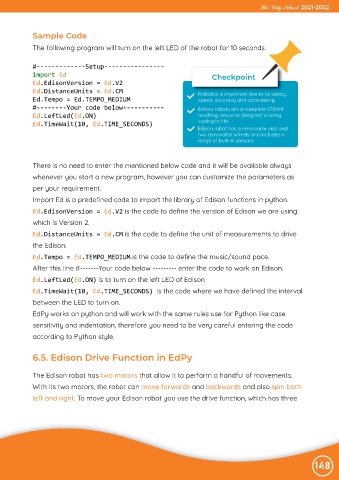
             The following program will turn on the left LED of the robot for 10 seconds.


             #-------------Setup----------------
             import Ed                                                     Checkpoint
             Ed.EdisonVersion = Ed.V2
             Ed.DistanceUnits = Ed.CM                                  Robotics is important due to its safety,
             Ed.Tempo = Ed.TEMPO_MEDIUM                                speed, accuracy and consistency
             #--------Your code below-----------                       Edison robots are a complete STEAM
             Ed.LeftLed(Ed.ON)                                         teaching resource designed to bring
             Ed.TimeWait(10, Ed.TIME_SECONDS)                          coding to life.
                                                                      Edison robot has a removable skid and
                                                                      two removable wheels and includes a
                                                                      range of built-in sensors.


             There is no need to enter the mentioned below code and it will be available always

             whenever you start a new program, however you can customize the parameters as
             per your requirement.

             Import Ed is a predefined code to import the library of Edison functions in python.
             Ed.EdisonVersion = Ed.V2 is the code to define the version of Edison we are using

             which is Version 2.
             Ed.DistanceUnits = Ed.CM is the code to define the unit of measurements to drive

             the Edison.
             Ed.Tempo = Ed.TEMPO_MEDIUM is the code to define the music/sound pace.

             After this line #-------Your code below --------- enter the code to work on Edison.
             Ed.LeftLed(Ed.ON) is to turn on the left LED of Edison

             Ed.TimeWait(10, Ed.TIME_SECONDS) is the code where we have defined the interval
             between the LED to turn on.

             EdPy works on python and will work with the same rules use for Python like case
             sensitivity and indentation, therefore you need to be very careful entering the code

             according to Python style.


             6.5. Edison Drive Function in EdPy


            The Edison robot has two motors that allow it to perform a handful of movements.

            With its two motors, the robot can move forwards and backwards and also spin both
            left and right. To move your Edison robot you use the drive function, which has three


                                                                                                                148

