


Page 147 - Computing E-Book Grade 7
P. 147
The City School  2021-2022


             Creating Online EdPy Account


             Using the online EdPy programming environment you can save your work online and
             have access to your projects from any browser. All you need to do is to create an

             account and log in. The online EdPy programming environment can be used with or

             without an account. Without an account, you don’t have the option to save a project so
                                                                                                                     Robotics
             that you can work on it later.


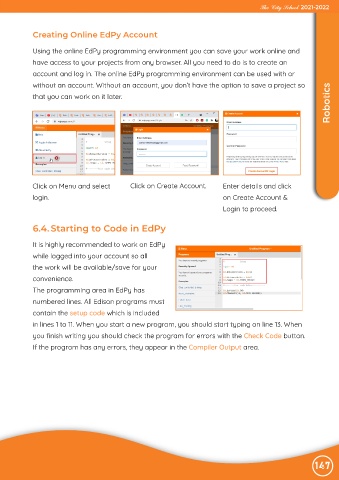
            Click on Menu and select           Click on Create Account.        Enter details and click
            login.                                                             on Create Account &

                                                                               Login to proceed.


             6.4. Starting to Code in EdPy

             It is highly recommended to work on EdPy

             while logged into your account so all
             the work will be available/save for your

             convenience.
             The programming area in EdPy has

             numbered lines. All Edison programs must
             contain the setup code which is included

             in lines 1 to 11. When you start a new program, you should start typing on line 13. When
             you finish writing you should check the program for errors with the Check Code button.

             If the program has any errors, they appear in the Compiler Output area.


                                                                                                                147

