


Page 98 - Computing E-Book Grade 7
P. 98
The City School  2021-2022


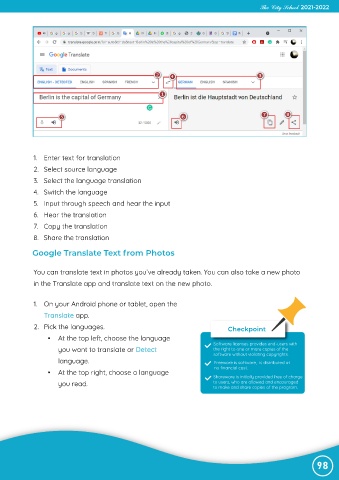
             1.  Enter text for translation

             2.  Select source language
             3.  Select the language translation

             4.  Switch the language
             5.  Input through speech and hear the input

             6.  Hear the translation
             7.  Copy the translation

             8.  Share the translation

            Google Translate Text from Photos


             You can translate text in photos you’ve already taken. You can also take a new photo

             in the Translate app and translate text on the new photo.


             1.  On your Android phone or tablet, open the
                Translate app.
             2.  Pick the languages.                                             Checkpoint

                  •  At the top left, choose the language
                                                                            Software licenses provides end-users with
                     you want to translate or Detect                        the right to one or more copies of the
                                                                            software without violating copyrights.
                     language.                                              Freeware is software,  is distributed at
                                                                            no financial cost.
                  •  At the top right, choose a language
                                                                            Shareware is initially provided free of charge
                     you read.                                              to users, who are allowed and encouraged
                                                                            to make and share copies of the program.


                                                                                                                98

