


Page 121 - Windows 10 May 2019 Update The Missing Manual: The Book That Should Have Been in the Box
P. 121
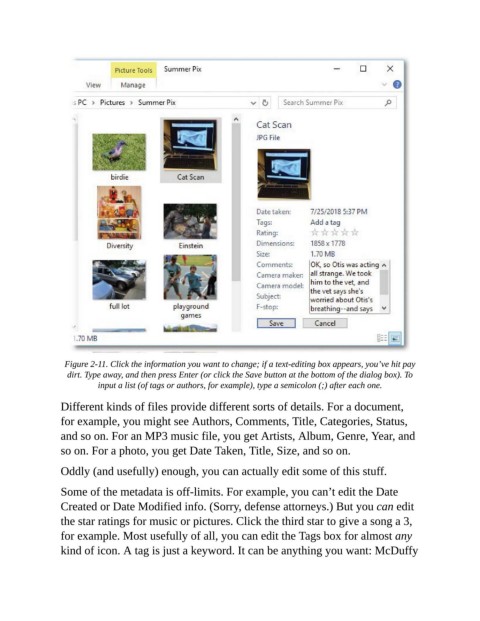
Figure 2-11. Click the information you want to change; if a text-editing box appears, you’ve hit pay
                  dirt. Type away, and then press Enter (or click the Save button at the bottom of the dialog box). To
                          input a list (of tags or authors, for example), type a semi colon (;) after each one.

                Different kinds of files provide different sorts of details. For a document,
                for example, you might see Authors, Comments, Title, Categories, Status,
                and so on. For an MP3 music file, you get Artists, Album, Genre, Year, and

                so on. For a photo, you get Date Taken, Title, Size, and so on.

                Oddly (and usefully) enough, you can actually edit some of this stuff.

                Some of the metadata is off-limits. For example, you can’t edit the Date

                Created or Date Modified info. (Sorry, defense attorneys.) But you can edit
                the star ratings for music or pictures. Click the third star to give a song a 3,
                for example. Most usefully of all, you can edit the Tags box for almost any

                kind of icon. A tag is just a keyword. It can be anything you want: McDuffy

