


Page 254 - Windows 10 May 2019 Update The Missing Manual: The Book That Should Have Been in the Box
P. 254
Technically, you’re not really sending them the files; you’re sending them a

                link to the files. But the effect is the same: With one click, your colleague
                can download a file or folder from your OneDrive, no matter how huge it is.


                Share a file or folder from the desktop

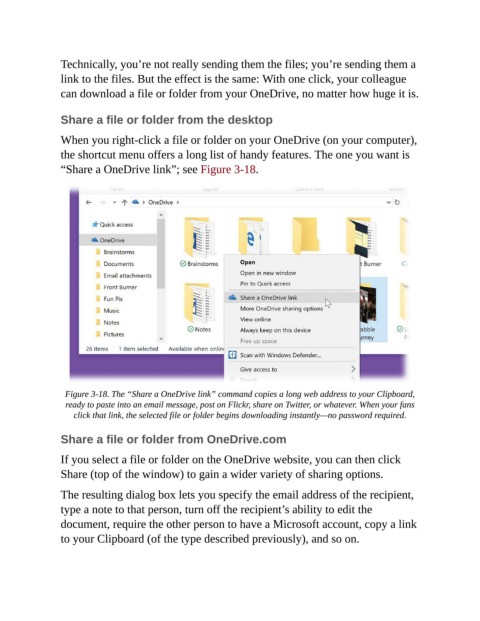
                When you right-click a file or folder on your OneDrive (on your computer),

                the shortcut menu offers a long list of handy features. The one you want is
                “Share a OneDrive link”; see Figure 3-18.


                  Figure 3-18. The “Share a OneDrive link” command copies a long web address to your Clipboard,
                  ready to paste into an email message, post on Flickr, share on Twitter, or whatever. When your fans
                    click that link, the selected file or folder begins downloading instantly—no password required.


                Share a file or folder from OneDrive.com

                If you select a file or folder on the OneDrive website, you can then click
                Share (top of the window) to gain a wider variety of sharing options.


                The resulting dialog box lets you specify the email address of the recipient,
                type a note to that person, turn off the recipient’s ability to edit the
                document, require the other person to have a Microsoft account, copy a link

                to your Clipboard (of the type described previously), and so on.

