


Page 485 - Windows 10 May 2019 Update The Missing Manual: The Book That Should Have Been in the Box
P. 485
Collection, Movies & TV, People, Photos, Weather, and Xbox apps, to

                name a few.

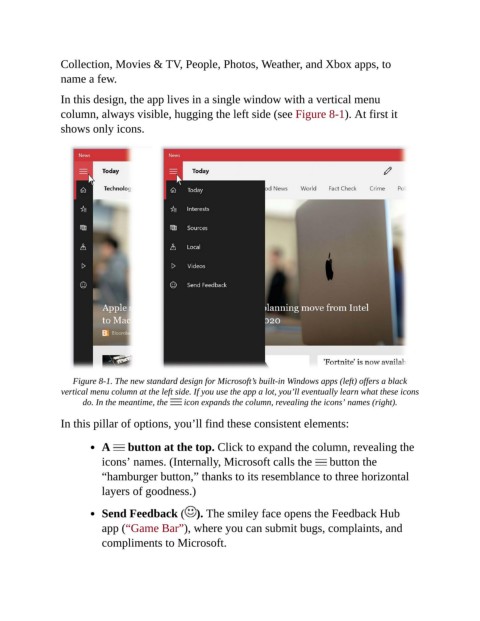
                In this design, the app lives in a single window with a vertical menu
                column, always visible, hugging the left side (see Figure 8-1). At first it
                shows only icons.


                    Figure 8-1. The new standard design for Microsoft’s built-in Windows apps (left) offers a black
                vertical menu column at the left side. If you use the app a lot, you’ll eventually learn what these icons
                      do. In the meantime, the    icon expands the column, revealing the icons’ names (right).

                In this pillar of options, you’ll find these consistent elements:


                           A      button at the top. Click to expand the column, revealing the

                           icons’ names. (Internally, Microsoft calls the   button the
                           “hamburger button,” thanks to its resemblance to three horizontal
                           layers of goodness.)


                           Send Feedback ( ). The smiley face opens the Feedback Hub
                           app (“Game Bar”), where you can submit bugs, complaints, and

                           compliments to Microsoft.

