


Page 580 - Windows 10 May 2019 Update The Missing Manual: The Book That Should Have Been in the Box
P. 580
Sticky Notes


                Sticky Notes creates virtual Post-it notes that you can stick anywhere on

                your screen—a triumphant software answer to the thousands of people who
                stick notes on the edges of their actual monitors.

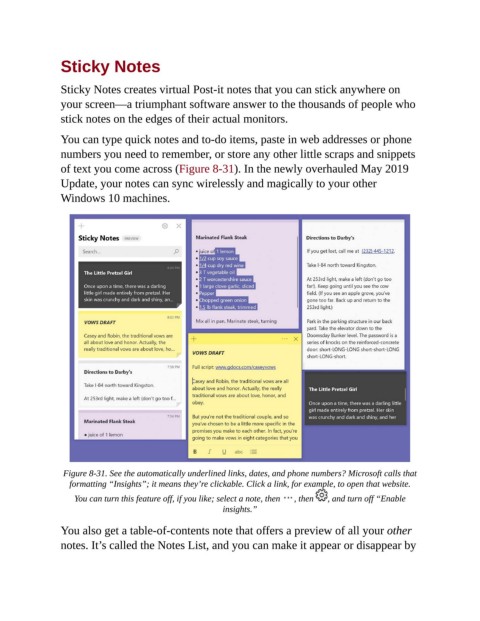
                You can type quick notes and to-do items, paste in web addresses or phone

                numbers you need to remember, or store any other little scraps and snippets
                of text you come across (Figure 8-31). In the newly overhauled May 2019
                Update, your notes can sync wirelessly and magically to your other
                Windows 10 machines.


                 Figure 8-31. See the automatically underlined links, dates, and phone numbers? Microsoft calls that
                   formatting “Insights”; it means they’re clickable. Click a link, for example, to open that website.

                    You can turn this feature off, if you like; select a note, then   , then   , and turn off “Enable
                                                          insights.”


                You also get a table-of-contents note that offers a preview of all your other
                notes. It’s called the Notes List, and you can make it appear or disappear by

