


Page 589 - Windows 10 May 2019 Update The Missing Manual: The Book That Should Have Been in the Box
P. 589
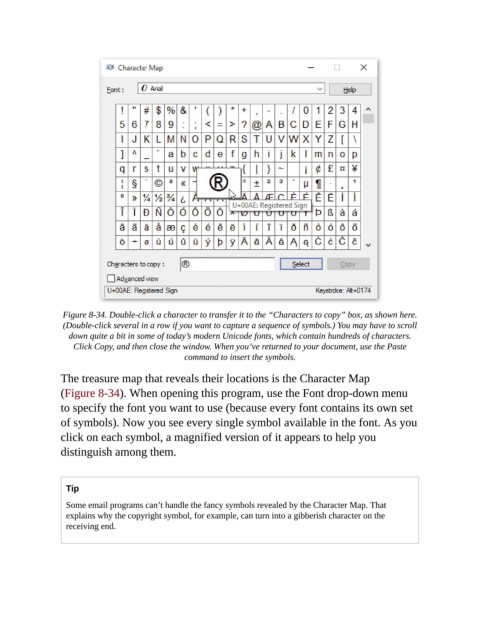
Figure 8-34. Double-click a character to transfer it to the “Characters to copy” box, as shown here.
                 (Double-click several in a row if you want to capture a sequence of symbols.) You may have to scroll
                  down quite a bit in some of today’s modern Unicode fonts, which contain hundreds of characters.
                    Click Copy, and then close the window. When you’ve returned to your document, use the Paste
                                                command to insert the symbols.

                The treasure map that reveals their locations is the Character Map

                (Figure 8-34). When opening this program, use the Font drop-down menu
                to specify the font you want to use (because every font contains its own set
                of symbols). Now you see every single symbol available in the font. As you

                click on each symbol, a magnified version of it appears to help you
                distinguish among them.


                  Tip

                  Some email programs can’t handle the fancy symbols revealed by the Character Map. That
                  explains why the copyright symbol, for example, can turn into a gibberish character on the
                  receiving end.

