


Page 679 - Windows 10 May 2019 Update The Missing Manual: The Book That Should Have Been in the Box
P. 679
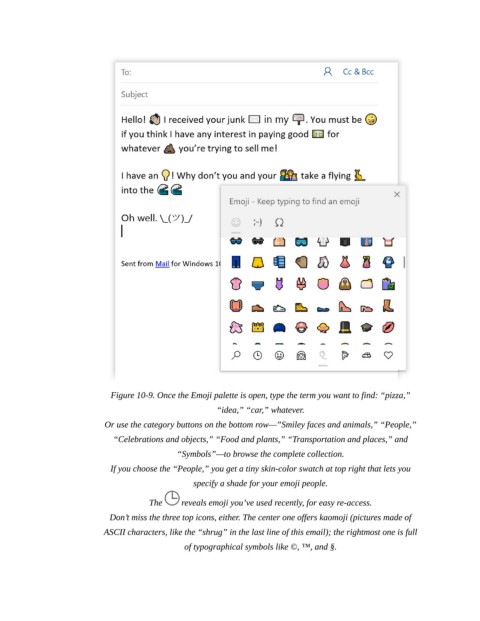
Figure 10-9. Once the Emoji palette is open, type the term you want to find: “pizza,”
                                                        “idea,” “car,” whatever.

                            Or use the category buttons on the bottom row—”Smiley faces and animals,” “People,”
                              “Celebrations and objects,” “Food and plants,” “Transportation and places,” and

                                              “Symbols”—to browse the complete collection.

                             If you choose the “People,” you get a tiny skin-color swatch at top right that lets you
                                                  specify a shade for your emoji people.

                                       The      reveals emoji you’ve used recently, for easy re-access.

                             Don’t miss the three top icons, either. The center one offers kaomoji (pictures made of
                           ASCII characters, like the “shrug” in the last line of this email); the rightmost one is full
                                                of typographical symbols like ©, ™, and §.

