


Page 36 - Impilo Yabantu User Manual
P. 36
Reporting


                   • Several reports are available throughout the site. Their locations on the


                        site and how to access them is outlined below


                    1)School Detailed Report


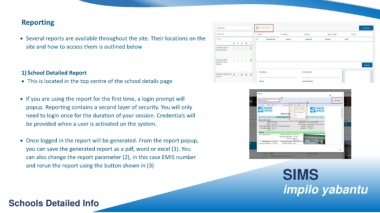
                    • This is located in the top centre of the school details page


                   • If you are using the report for the first time, a login prompt will


                        popup. Reporting contains a second layer of security. You will only


                        need to login once for the duration of your session. Credentials will


                        be provided when a user is activated on the system.


                   • Once logged in the report will be generated. From the report popup,


                        you can save the generated report as a pdf, word or excel (1). You


                        can also change the report parameter (2), in this case EMIS number


                        and rerun the report using the button shown in (3)
                                                                                                                                                                                                                                                               SIMS


                                                                                                                                                                                                                                                               impilo yabantu


         Schools Detailed Info

