


Page 1085 - (ISC)² CISSP Certified Information Systems Security Professional Official Study Guide
P. 1085
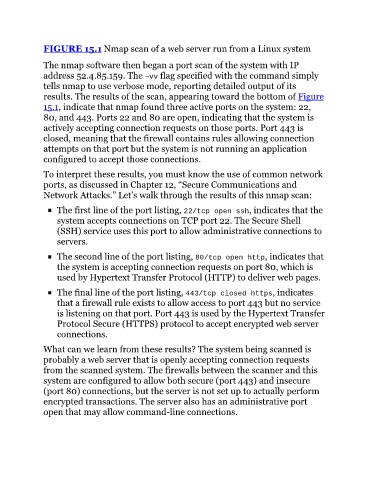
FIGURE 15.1 Nmap scan of a web server run from a Linux system


               The nmap software then began a port scan of the system with IP
               address 52.4.85.159. The –vv flag specified with the command simply
               tells nmap to use verbose mode, reporting detailed output of its
               results. The results of the scan, appearing toward the bottom of Figure
               15.1, indicate that nmap found three active ports on the system: 22,
               80, and 443. Ports 22 and 80 are open, indicating that the system is

               actively accepting connection requests on those ports. Port 443 is
               closed, meaning that the firewall contains rules allowing connection
               attempts on that port but the system is not running an application
               configured to accept those connections.

               To interpret these results, you must know the use of common network
               ports, as discussed in Chapter 12, “Secure Communications and

               Network Attacks.” Let’s walk through the results of this nmap scan:
                    The first line of the port listing, 22/tcp open ssh, indicates that the

                    system accepts connections on TCP port 22. The Secure Shell
                    (SSH) service uses this port to allow administrative connections to
                    servers.

                    The second line of the port listing, 80/tcp open http, indicates that
                    the system is accepting connection requests on port 80, which is
                    used by Hypertext Transfer Protocol (HTTP) to deliver web pages.


                    The final line of the port listing, 443/tcp closed https, indicates
                    that a firewall rule exists to allow access to port 443 but no service
                    is listening on that port. Port 443 is used by the Hypertext Transfer
                    Protocol Secure (HTTPS) protocol to accept encrypted web server
                    connections.

               What can we learn from these results? The system being scanned is
               probably a web server that is openly accepting connection requests

               from the scanned system. The firewalls between the scanner and this
               system are configured to allow both secure (port 443) and insecure
               (port 80) connections, but the server is not set up to actually perform
               encrypted transactions. The server also has an administrative port
               open that may allow command-line connections.

