


Page 31 - Computing Book 7
P. 31
Building a Website – Adobe Dreamweaver                                               Class 7


               HTML Tag Attributes:

               Attributes define additional characteristics or properties of the element such as width and height of
               an image. Attributes are always specified in the start tag (or opening tag) and usually consists of
               name/value pairs like name="value".

               Creating a Web Page:

               Creating an HTML page is easy as saving a notepad document, Follow the steps below to save an
               HTML using a simple text editor like Notepad.
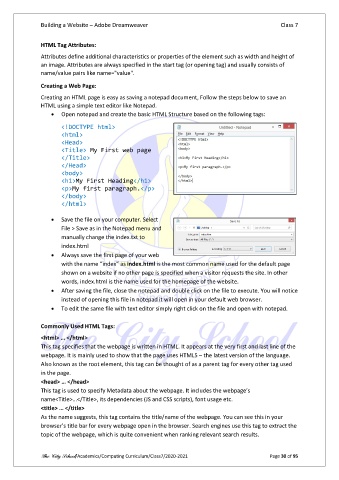
                   •  Open notepad and create the basic HTML Structure based on the following tags:

                       <!DOCTYPE html>
                       <html>
                       <Head>
                       <Title> My First web page
                       </Title>
                       </Head>
                       <body>
                       <h1>My First Heading</h1>
                       <p>My first paragraph.</p>
                       </body>
                       </html>

                   •  Save the file on your computer. Select
                       File > Save as in the Notepad menu and
                       manually change the index.txt to
                       index.html
                   •  Always save the first page of your web
                       with the name “index” as index.html is the most common name used for the default page
                       shown on a website if no other page is specified when a visitor requests the site. In other
                       words, index.html is the name used for the homepage of the website.
                   •  After saving the file, close the notepad and double click on the file to execute. You will notice
                       instead of opening this file in notepad it will open in your default web browser.
                   •  To edit the same file with text editor simply right click on the file and open with notepad.

               Commonly Used HTML Tags:
               <html> … </html>
               This tag specifies that the webpage is written in HTML. It appears at the very first and last line of the
               webpage. It is mainly used to show that the page uses HTML5 – the latest version of the language.
               Also known as the root element, this tag can be thought of as a parent tag for every other tag used
               in the page.
               <head> … </head>
               This tag is used to specify Metadata about the webpage. It includes the webpage’s
               name<Title>…</Title>, its dependencies (JS and CSS scripts), font usage etc.
               <title> … </title>
               As the name suggests, this tag contains the title/name of the webpage. You can see this in your
               browser’s title bar for every webpage open in the browser. Search engines use this tag to extract the
               topic of the webpage, which is quite convenient when ranking relevant search results.


               The City School/Academics/Computing Curriculum/Class7/2020-2021                  Page 30 of 95

