


Page 33 - Computing Book 7
P. 33
Building a Website – Adobe Dreamweaver                                               Class 7


               Getting Started with Dreamweaver:

               Welcome screen:
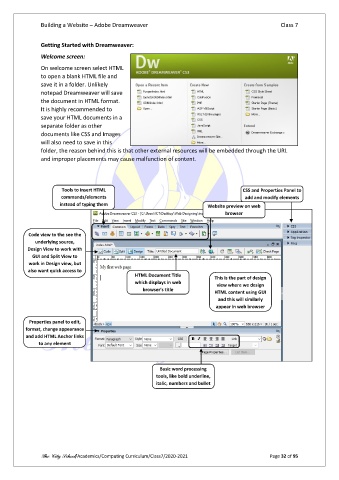
               On welcome screen select HTML
               to open a blank HTML file and
               save it in a folder. Unlikely
               notepad Dreamweaver will save
               the document in HTML format.
               It is highly recommended to
               save your HTML documents in a
               separate folder as other
               documents like CSS and Images
               will also need to save in this
               folder, the reason behind this is that other external resources will be embedded through the URL
               and improper placements may cause malfunction of content.


                       Tools to insert HTML                                           CSS and Properties Panel to
                       commands/elements                                               add and modify elements
                      instead of typing them                              Website preview on web
                                                                                browser


           Code view to the see the
             underlying source,
           Design View to work with
            GUI and Split View to
           work in Design view, but
           also want quick access to
                                                HTML Document Title
                 the code                                                   This is the part of design
                                                which displays in web
                                                                             view where we design
                                                   browser’s title
                                                                            HTML content using GUI
                                                                              and this will similarly
                                                                             appear in web browser

           Properties panel to edit,
          format, change appearance
          and add HTML Anchor links
               to any element


                                                         Basic word processing
                                                        tools, like bold underline,
                                                        italic, numbers and bullet


               The City School/Academics/Computing Curriculum/Class7/2020-2021                  Page 32 of 95

