


Page 54 - Computing Book 7
P. 54
All About Cloud                                                                      Class 7


               For example, my home is not a public place and I want to share my home location to a childhood
               friend who is new in town and does not know the neighbourhood.
                   •  I will open the google maps and locate my house on maps by clicking   or manually locate
                       my house using the nearest landmark.
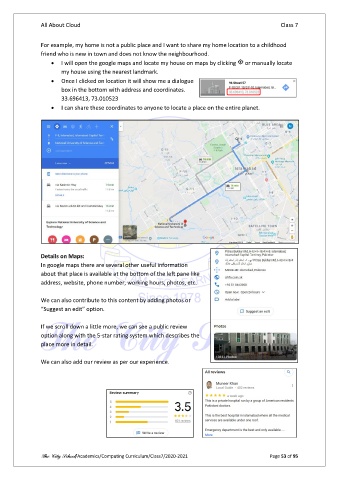
                   •  Once I clicked on location it will show me a dialogue
                       box in the bottom with address and coordinates.
                       33.696413, 73.010523
                   •  I can share these coordinates to anyone to locate a place on the entire planet.


               Details on Maps:
               In google maps there are several other useful information
               about that place is available at the bottom of the left pane like
               address, website, phone number, working hours, photos, etc.

               We can also contribute to this content by adding photos or
               “Suggest an edit” option.

               If we scroll down a little more, we can see a public review
               option along with the 5-star rating system which describes the
               place more in detail.

               We can also add our review as per our experience.


               The City School/Academics/Computing Curriculum/Class7/2020-2021                  Page 53 of 95

