


Page 93 - Computing Book 5
P. 93
Interactive Stories                                                                  Class 5


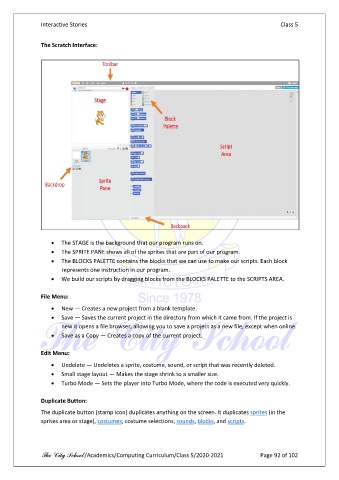
               The Scratch Interface:


                   •  The STAGE is the background that our program runs on.
                   •  The SPRITE PANE shows all of the sprites that are part of our program.
                   •  The BLOCKS PALETTE contains the blocks that we can use to make our scripts. Each block
                       represents one instruction in our program.

                   •  We build our scripts by dragging blocks from the BLOCKS PALETTE to the SCRIPTS AREA.

               File Menu:

                   •  New — Creates a new project from a blank template.
                   •  Save — Saves the current project in the directory from which it came from. If the project is
                       new it opens a file browser, allowing you to save a project as a new file, except when online.
                   •  Save as a Copy — Creates a copy of the current project.

               Edit Menu:
                   •  Undelete — Undeletes a sprite, costume, sound, or script that was recently deleted.
                   •  Small stage layout — Makes the stage shrink to a smaller size.
                   •  Turbo Mode — Sets the player into Turbo Mode, where the code is executed very quickly.

               Duplicate Button:

               The duplicate button (stamp icon) duplicates anything on the screen. It duplicates sprites (in the
               sprites area or stage), costumes, costume selections, sounds, blocks, and scripts.


               The City School /Academics/Computing Curriculum/Class 5/2020-2021            Page 92 of 102

