


Page 96 - Computing Book 5
P. 96
Interactive Stories                                                                  Class 5


               Looks Block:

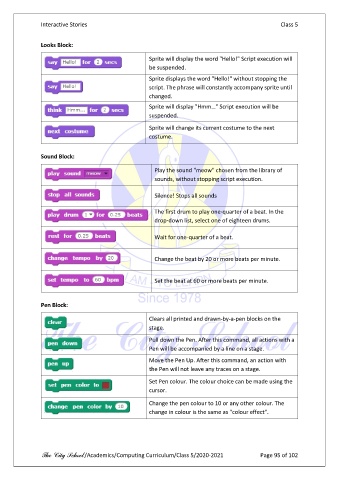
                                                     Sprite will display the word "Hello!" Script execution will
                                                     be suspended.

                                                     Sprite displays the word "Hello!" without stopping the
                                                     script. The phrase will constantly accompany sprite until

                                                     changed.
                                                     Sprite will display "Hmm…" Script execution will be
                                                     suspended.
                                                     Sprite will change its current costume to the next

                                                     costume.

               Sound Block:

                                                       Play the sound "meow" chosen from the library of
                                                       sounds, without stopping script execution.

                                                       Silence! Stops all sounds


                                                       The first drum to play one-quarter of a beat. In the
                                                       drop-down list, select one of eighteen drums.

                                                       Wait for one-quarter of a beat.


                                                       Change the beat by 20 or more beats per minute.


                                                       Set the beat at 60 or more beats per minute.


               Pen Block:

                                                     Clears all printed and drawn-by-a-pen blocks on the
                                                     stage.

                                                     Pull down the Pen. After this command, all actions with a
                                                     Pen will be accompanied by a line on a stage.
                                                     Move the Pen Up. After this command, an action with
                                                     the Pen will not leave any traces on a stage.

                                                     Set Pen colour. The colour choice can be made using the
                                                     cursor.

                                                     Change the pen colour to 10 or any other colour. The
                                                     change in colour is the same as "colour effect".


               The City School /Academics/Computing Curriculum/Class 5/2020-2021            Page 95 of 102

