


Page 94 - Computing Book 5
P. 94
Interactive Stories                                                                  Class 5


               Delete Button:

               The delete button (scissors icon) deletes anything on the screen. It deletes sprites (in the sprites area
               or stage), costumes, costume selections, sounds, blocks, and scripts.

               Enlarge Button:
               Clicking on a sprite in the stage, costume editor, or a selection in the costume editor will make the
               sprite or selection grow bigger.

               Shrink Button:
               Clicking on a sprite in the stage, costume editor, or a selection in the costume editor will make the
               sprite or selection shrink.


               Help Button:

               The � button opens the Tips Window. Clicking on a part of the editor or a block will give help on
               that section.

               All Tips:

               These are informational sections with helpful
               tutorials and information about the scratch
               website itself.

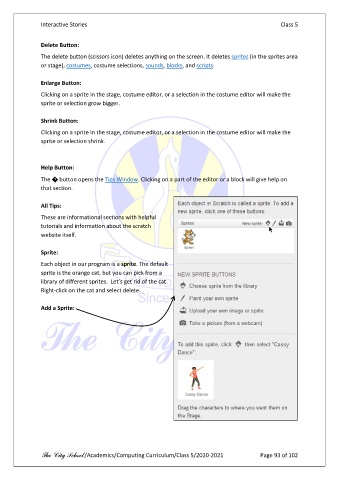
               Sprite:
               Each object in our program is a sprite. The default
               sprite is the orange cat, but you can pick from a
               library of different sprites.  Let’s get rid of the cat.
               Right-click on the cat and select delete.

               Add a Sprite:


               The City School /Academics/Computing Curriculum/Class 5/2020-2021            Page 93 of 102

