


Page 85 - TCS ICT Book 8
P. 85
The City School  2021-2022


             Declaring a Public Variable


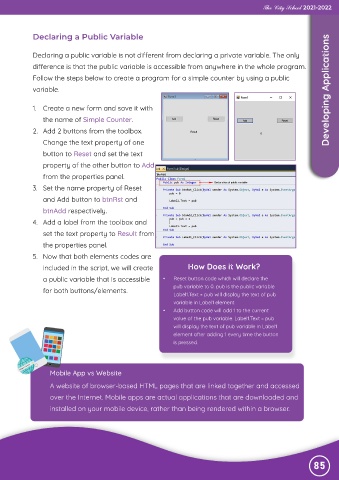
             Declaring a public variable is not different from declaring a private variable. The only
             difference is that the public variable is accessible from anywhere in the whole program.

             Follow the steps below to create a program for a simple counter by using a public
             variable.                                                                                              Developing Applications


             1.  Create a new form and save it with

                the name of Simple Counter.

             2.  Add 2 buttons from the toolbox.
                Change the text property of one
                button to Reset and set the text

                property of the other button to Add

                from the properties panel.
             3.  Set the name property of Reset
                and Add button to btnRst and

                btnAdd respectively.

             4.  Add a label from the toolbox and
                set the text property to Result from
                the properties panel.

             5.  Now that both elements codes are

                included in the script, we will create             How Does it Work?
                a public variable that is accessible      •   Reset button code which will declare the
                for both buttons/elements.                    pub variable to 0. pub is the public variable
                                                              Label1.Text = pub will display the text of pub
                                                              variable in Label1 element.
                                                          •   Add button code will add 1 to the current
                                                              value of the pub variable. Label1.Text = pub
                                                              will display the text of pub variable in Label1
                                                              element after adding 1 every time the button
                                                              is pressed.


                   Mobile App vs Website
                   A website of browser-based HTML pages that are linked together and accessed

                   over the Internet. Mobile apps are actual applications that are downloaded and
                   installed on your mobile device, rather than being rendered within a browser.


                                                                                                               85

