


Page 87 - TCS ICT Book 8
P. 87
The City School  2021-2022


             4.8. Conditional Statements


             Programming is all about giving autonomy to the computers. Computers have limited

             intelligence and they can’t make decisions on their own unless we program them
             to take decisions. Therefore, decision making is an essential part of programming.
             Decision making statements allow to specify one or more conditions to be executed                      Developing Applications

             if the condition is determined to be true. Through decision making statements, we can

             write a program that will be able to respond to user input during its execution and give
             different results for different inputs. This process is possible with the use of conditional
             statements or If…Then statements


             If...Then Statement

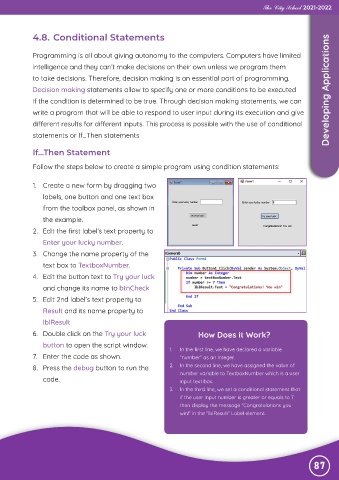
             Follow the steps below to create a simple program using condition statements:


             1.  Create a new form by dragging two
                labels, one button and one text box
                from the toolbox panel, as shown in

                the example.

             2.  Edit the first label’s text property to
                Enter your lucky number.
             3.  Change the name property of the

                text box to TextboxNumber.

             4.  Edit the button text to Try your luck
                and change its name to btnCheck
             5.  Edit 2nd label’s text property to

                Result and its name property to

                lblResult
             6.  Double click on the Try your luck                     How Does it Work?
                button to open the script window.
                                                             1.   In the first line, we have declared a variable
             7.  Enter the code as shown.                       “number” as an integer.

             8.  Press the debug button to run the           2.  In the second line, we have assigned the value of
                                                                number variable to TextboxNumber which is a user
                code.                                           input text box.
                                                             3.   In the third line, we set a conditional statement that
                                                                if the user input number is greater or equals to 7
                                                                then display the message “Congratulations you
                                                                win!” in the “lblResult” Label element.


                                                                                                               87

