


Page 43 - TCS ICT Book 7
P. 43
The City School  2021-2022


             Pivot Charts

             Pivot Charts are like regular charts, except they display data from a Pivot Table. Just

             like regular charts, you’ll be able to select a chart type, layout, and style that will best

             represent the data.

             Adding Pivot Charts                                                                                    Data Handling


             In the example below, our PivotTable is showing a portion of each region’s sales

             figures. We’ll use a PivotChart so we can see the information more clearly.


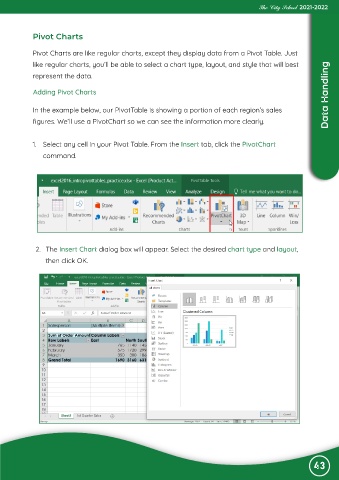
             1.  Select any cell in your Pivot Table. From the Insert tab, click the PivotChart

                command.


             2.  The Insert Chart dialog box will appear. Select the desired chart type and layout,
                 then click OK.


                                                                                                               43

