


Page 110 - Learn To Program With Scratch
P. 110
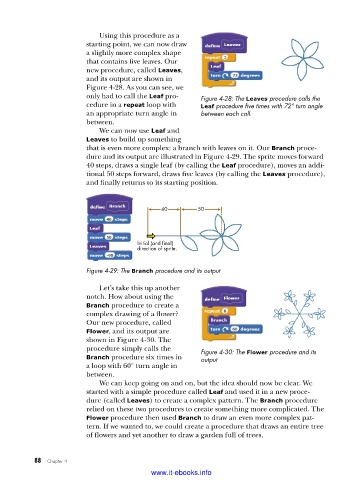
Using this procedure as a
                         starting point, we can now draw
                         a slightly more complex shape
                         that contains five leaves. Our
                         new procedure, called Leaves,
                         and its output are shown in
                         Figure 4-28. As you can see, we
                         only had to call the Leaf pro-  Figure 4-28: The Leaves procedure calls the
                         cedure in a repeat loop with    Leaf procedure five times with 72° turn angle
                         an appropriate turn angle in    between each call .
                         between.
                             We can now use Leaf and
                         Leaves to build up something
                         that is even more complex: a branch with leaves on it. Our Branch proce-
                         dure and its output are illustrated in Figure 4-29. The sprite moves forward
                         40 steps, draws a single leaf (by calling the Leaf procedure), moves an addi-
                         tional 50 steps forward, draws five leaves (by calling the Leaves procedure),
                         and finally returns to its starting position.


                                              40        50


                                       Initial (and final)
                                       direction of sprite.

                         Figure 4-29: The Branch procedure and its output

                             Let’s take this up another
                         notch. How about using the
                         Branch procedure to  create a
                         complex drawing of a flower?
                         Our new procedure, called
                         Flower, and its output are
                         shown in Figure 4-30. The
                           procedure simply calls the    Figure 4-30: The Flower procedure and its
                         Branch procedure six times in   output
                         a loop with 60° turn angle in
                         between.
                             We can keep going on and on, but the idea should now be clear. We
                         started with a simple procedure called Leaf and used it in a new proce-
                         dure (called Leaves) to create a complex pattern. The Branch procedure
                         relied on these two procedures to create something more complicated. The
                         Flower procedure then used Branch to draw an even more complex pat-
                         tern. If we wanted to, we could create a procedure that draws an entire tree
                         of flowers and yet another to draw a garden full of trees.


           88   Chapter 4
                                           www.it-ebooks.info

