


Page 115 - Learn To Program With Scratch
P. 115
parameter slot is related to the data type it accepts. Try entering your name
                          (or any other text) in the move 10 steps block; you’ll find that Scratch
                          allows you to enter only numbers into the rounded-rectangle slot.
                             Similarly, the shape of a function block indicates the data type it returns.
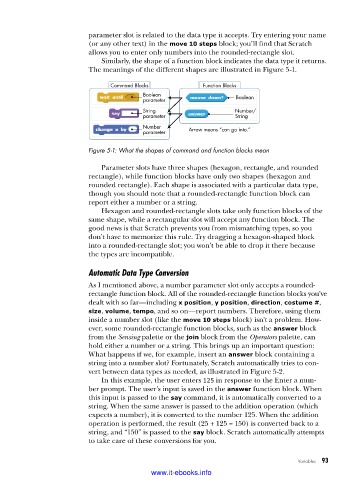
                          The meanings of the different shapes are illustrated in Figure 5-1.

                                Command Blocks           Function Blocks
                                         Boolean                   Boolean
                                         parameter
                                         String                   Number/
                                         parameter                String
                                         Number      Arrow means “can go into.”
                                         parameter

                          Figure 5-1: What the shapes of command and function blocks mean

                             Parameter slots have three shapes (hexagon, rectangle, and rounded
                          rectangle), while function blocks have only two shapes (hexagon and
                          rounded rectangle). Each shape is associated with a particular data type,
                          though you should note that a rounded-rectangle function block can
                          report either a number or a string.
                             Hexagon and rounded-rectangle slots take only function blocks of the
                          same shape, while a rectangular slot will accept any function block. The
                          good news is that Scratch prevents you from mismatching types, so you
                          don’t have to memorize this rule. Try dragging a hexagon-shaped block
                          into a rounded-rectangle slot; you won’t be able to drop it there because
                          the types are incompatible.

                          Automatic Data Type Conversion

                          As I mentioned above, a number parameter slot only accepts a rounded-
                          rectangle function block. All of the rounded-rectangle function blocks you’ve
                          dealt with so far—including x position, y position, direction, costume #,
                          size, volume, tempo, and so on—report numbers. Therefore, using them
                          inside a number slot (like the move 10 steps block) isn’t a problem. How-
                          ever, some rounded-rectangle function blocks, such as the answer block
                          from the Sensing palette or the join block from the Operators palette, can
                          hold either a number or a string. This brings up an important question:
                          What happens if we, for example, insert an answer block containing a
                          string into a number slot? Fortunately, Scratch automatically tries to con-
                          vert between data types as needed, as illustrated in Figure 5-2.
                             In this example, the user enters 125 in response to the Enter a num-
                          ber prompt. The user’s input is saved in the answer function block. When
                          this input is passed to the say command, it is automatically converted to a
                          string. When the same answer is passed to the addition operation (which
                          expects a number), it is converted to the number 125. When the addition
                          operation is performed, the result (25 + 125 = 150) is converted back to a
                          string, and “150” is passed to the say block. Scratch automatically attempts
                          to take care of these conversions for you.

                                                                                    Variables   93

                                           www.it-ebooks.info

