


Page 105 - Learn To Program With Scratch
P. 105
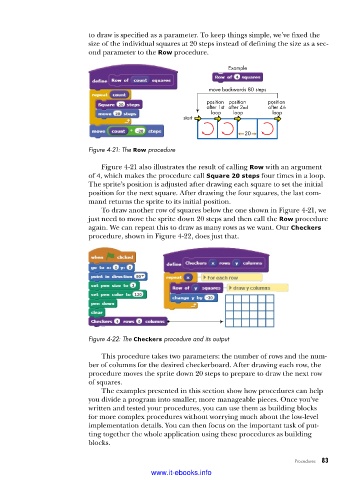
to draw is specified as a parameter. To keep things simple, we’ve fixed the
                          size of the individual squares at 20 steps instead of defining the size as a sec-
                          ond parameter to the Row procedure.

                                                                Example


                                                           move backwards 80 steps
                                                          position  position   position
                                                          after 1st  after 2nd  after 4th
                                                            loop  loop       loop
                                                    start
                                                                     20

                          Figure 4-21: The Row procedure

                             Figure 4-21 also illustrates the result of calling Row with an argument
                          of 4, which makes the procedure call Square 20 steps four times in a loop.
                          The sprite’s position is adjusted after drawing each square to set the initial
                          position for the next square. After drawing the four squares, the last com-
                          mand returns the sprite to its initial position.
                             To draw another row of squares below the one shown in Figure 4-21, we
                          just need to move the sprite down 20 steps and then call the Row procedure
                          again. We can repeat this to draw as many rows as we want. Our Checkers
                          procedure, shown in Figure 4-22, does just that.


                          Figure 4-22: The Checkers procedure and its output

                             This procedure takes two parameters: the number of rows and the num-
                          ber of columns for the desired checkerboard. After drawing each row, the
                          procedure moves the sprite down 20 steps to prepare to draw the next row
                          of squares.
                             The examples presented in this section show how procedures can help
                          you divide a program into smaller, more manageable pieces. Once you’ve
                          written and tested your procedures, you can use them as building blocks
                          for more complex procedures without worrying much about the low-level
                          implementation details. You can then focus on the important task of put-
                          ting together the whole application using these procedures as building
                          blocks.

                                                                                   Procedures   83

                                           www.it-ebooks.info

