


Page 134 - Learn To Program With Scratch
P. 134
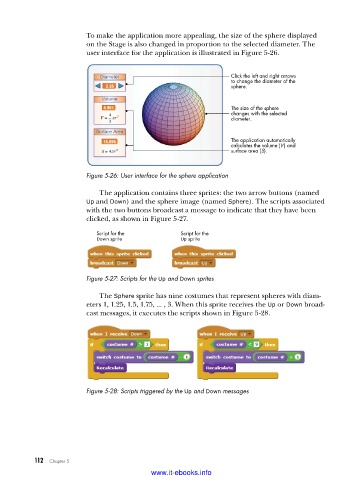
To make the application more appealing, the size of the sphere displayed
                         on the Stage is also changed in proportion to the selected diameter. The
                         user interface for the application is illustrated in Figure 5-26.


                                                                 Click the left and right arrows
                                                                 to change the diameter of the
                                                                 sphere.

                                                                 The size of the sphere
                                                                 changes with the selected
                                                                 diameter.


                                                                 The application automatically
                                                                 calculates the volume (V ) and
                                                                 surface area (S).


                         Figure 5-26: User interface for the sphere application

                             The application contains three sprites: the two arrow buttons (named
                         Up and Down) and the sphere image (named Sphere). The scripts associated
                         with the two buttons broadcast a message to indicate that they have been
                         clicked, as shown in Figure 5-27.

                            Script for the         Script for the
                            Down sprite            Up sprite


                         Figure 5-27: Scripts for the Up and Down sprites
                             The Sphere sprite has nine costumes that represent spheres with diam-
                         eters 1, 1.25, 1.5, 1.75, ... , 3. When this sprite receives the Up or Down broad-
                         cast messages, it executes the scripts shown in Figure 5-28.


                         Figure 5-28: Scripts triggered by the Up and Down messages


           112   Chapter 5
                                           www.it-ebooks.info

