


Page 192 - Learn To Program With Scratch
P. 192
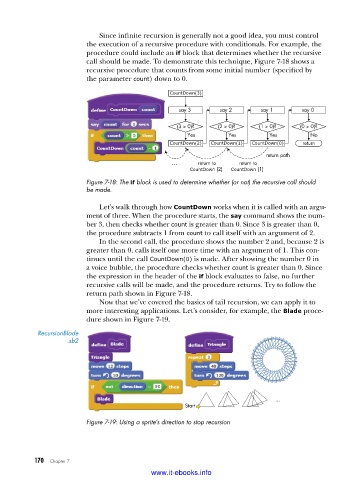
Since infinite recursion is generally not a good idea, you must control
                         the execution of a recursive procedure with conditionals. For example, the
                         procedure could include an if block that determines whether the recursive
                         call should be made. To demonstrate this technique, Figure 7-18 shows a
                         recursive procedure that counts from some initial number (specified by
                         the parameter count) down to 0.

                                                CountDown(3)
                                                   say 3      say 2      say 1       say 0

                                                  (3 > 0)?    (2 > 0)?   (1 > 0)?   (0 > 0)?
                                                     Yes        Yes         Yes        No
                                                CountDown(2)  CountDown(1)  CountDown(0)  return
                                                                           return path
                                                 ...    return to  return to
                                                      CountDown (2)   CountDown (1)
                         Figure 7-18: The if block is used to determine whether (or not) the recursive call should
                         be made .

                             Let’s walk through how CountDown works when it is called with an argu-
                         ment of three. When the procedure starts, the say command shows the num-
                         ber 3, then checks whether count is greater than 0. Since 3 is greater than 0,
                         the procedure subtracts 1 from count to call itself with an argument of 2.
                             In the second call, the procedure shows the number 2 and, because 2 is
                         greater than 0, calls itself one more time with an argument of 1. This con-
                         tinues until the call CountDown(0) is made. After showing the number 0 in
                         a voice bubble, the procedure checks whether count is greater than 0. Since
                         the expression in the header of the if block evaluates to false, no further
                         recursive calls will be made, and the procedure returns. Try to follow the
                         return path shown in Figure 7-18.
                             Now that we’ve covered the basics of tail recursion, we can apply it to
                         more interesting applications. Let’s consider, for example, the Blade proce-
                         dure shown in Figure 7-19.
           RecursionBlade
                     .sb2


                                                                             ...
                                                    Start
                         Figure 7-19: Using a sprite’s direction to stop recursion


           170   Chapter 7
                                           www.it-ebooks.info

