


Page 196 - Learn To Program With Scratch
P. 196
As shown, the game contains five sprites: Bird1, a clone of Bird1, Bird2,
                         a shooter, and a bullet. The player can move the shooter horizontally using
                         the left and right keyboard arrows. Pressing the spacebar fires a bullet
                         into the sky. If the bullet hits Bird1 or its clone, the player gets a point. Bird2
                         is an endangered species, so the player isn’t allowed to shoot that one; if the
                         bullet hits that sprite, the game ends. The player has one minute to shoot
                         as many birds as possible.
                             Each bird uses two costumes. When switching between these two cos-
                         tumes, the birds appear to be flapping their wings.
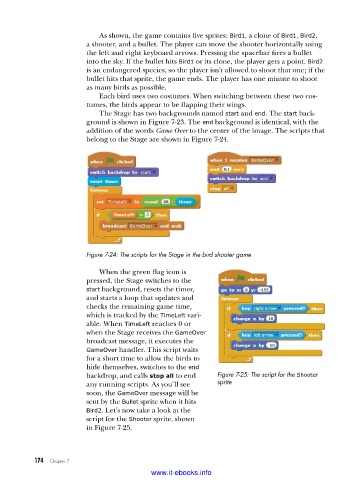
                             The Stage has two backgrounds named start and end. The start back-
                         ground is shown in Figure 7-23. The end background is identical, with the
                         addition of the words Game Over to the center of the image. The scripts that
                         belong to the Stage are shown in Figure 7-24.


                         Figure 7-24: The scripts for the Stage in the bird shooter game

                             When the green flag icon is
                         pressed, the Stage switches to the
                         start background, resets the timer,
                         and starts a loop that updates and
                         checks the remaining game time,
                         which is tracked by the TimeLeft vari-
                         able. When TimeLeft reaches 0 or
                         when the Stage receives the GameOver
                         broadcast message, it executes the
                         GameOver handler. This script waits
                         for a short time to allow the birds to
                         hide themselves, switches to the end
                         backdrop, and calls stop all to end   Figure 7-25: The script for the Shooter
                         any running scripts. As you’ll see   sprite
                         soon, the GameOver message will be
                         sent by the Bullet sprite when it hits
                         Bird2. Let’s now take a look at the
                         script for the Shooter sprite, shown
                         in Figure 7-25.


           174   Chapter 7
                                           www.it-ebooks.info

