


Page 193 - Learn To Program With Scratch
P. 193
We assume that the sprite that executes this procedure starts some-
                          where on the Stage pointing in the direction of 90°. After drawing an
                          equilateral triangle, the sprite moves 12 steps forward and then turns 10°
                          counterclockwise. The procedure then checks the new direction of the
                          sprite. If the sprite is not pointing in the direction of 90°, the procedure
                          calls itself again to draw the next triangle in the sequence. Otherwise, the
                          recursive call doesn’t happen, and the procedure ends after drawing the
                          saw blade shown in Figure 7-19.
                             For simple examples like the ones shown here, it is probably easier to
                          use a repeat block to achieve the desired repetition. But as I mentioned at
                          the start of this section, there are many problems that are easier to solve
                          with recursion rather than iteration.


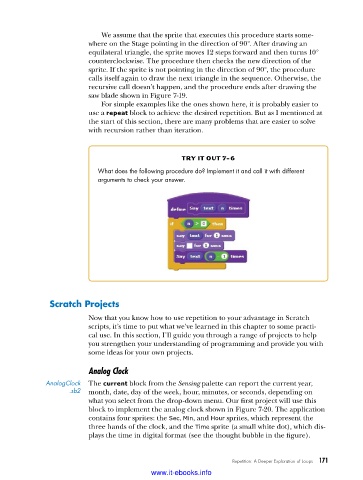
                                                    try it out 7-6
                            What does the following procedure do? Implement it and call it with different
                            arguments to check your answer .


               Scratch Projects
                          Now that you know how to use repetition to your advantage in Scratch
                          scripts, it’s time to put what we’ve learned in this chapter to some practi-
                          cal use. In this section, I’ll guide you through a range of projects to help
                          you strengthen your understanding of programming and provide you with
                          some ideas for your own projects.

                          Analog Clock

              AnalogClock   The current block from the Sensing palette can report the current year,
                     .sb2  month, date, day of the week, hour, minutes, or seconds, depending on
                          what you select from the drop-down menu. Our first project will use this
                          block to implement the analog clock shown in Figure 7-20. The application
                          contains four sprites: the Sec, Min, and Hour sprites, which represent the
                          three hands of the clock, and the Time sprite (a small white dot), which dis-
                          plays the time in digital format (see the thought bubble in the figure).


                                                                  Repetition: A Deeper Exploration of Loops   171

                                           www.it-ebooks.info

