


Page 194 - Learn To Program With Scratch
P. 194
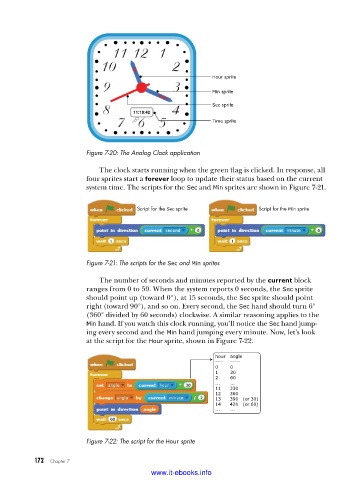
Hour sprite
                                                            Min sprite

                                                            Sec sprite
                                                            Time sprite


                         Figure 7-20: The Analog Clock application

                             The clock starts running when the green flag is clicked. In response, all
                         four sprites start a forever loop to update their status based on the current
                         system time. The scripts for the Sec and Min sprites are shown in Figure 7-21.


                                       Script for the Sec sprite         Script for the Min sprite


                         Figure 7-21: The scripts for the Sec and Min sprites

                             The number of seconds and minutes reported by the current block
                         ranges from 0 to 59. When the system reports 0 seconds, the Sec sprite
                         should point up (toward 0°), at 15 seconds, the Sec sprite should point
                         right (toward 90°), and so on. Every second, the Sec hand should turn 6°
                         (360° divided by 60 seconds) clockwise. A similar reasoning applies to the
                         Min hand. If you watch this clock running, you’ll notice the Sec hand jump-
                         ing every second and the Min hand jumping every minute. Now, let’s look
                         at the script for the Hour sprite, shown in Figure 7-22.

                                                             hour   angle
                                                             ----    ----
                                                                 -
                                                             0        0
                                                             1        30
                                                             2        60
                                                             ...       ...
                                                             11      330
                                                             12      360
                                                             13      390   (or 30)
                                                             14      420   (or 60)
                                                             ...       ...


                         Figure 7-22: The script for the Hour sprite


           172   Chapter 7
                                           www.it-ebooks.info

