


Page 243 - Learn To Program With Scratch
P. 243
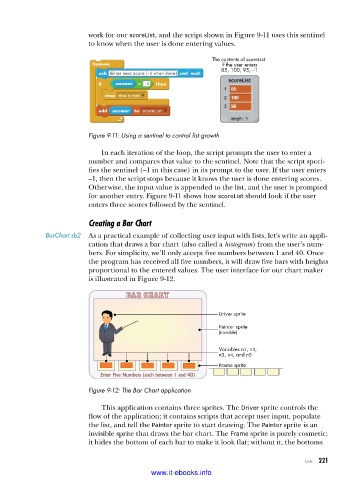
work for our scoreList, and the script shown in Figure 9-11 uses this sentinel
                          to know when the user is done entering values.

                                                            The contents of scoreList
                                                               if the user enters
                                                              85, 100, 95, –1


                          Figure 9-11: Using a sentinel to control list growth

                             In each iteration of the loop, the script prompts the user to enter a
                          number and compares that value to the sentinel. Note that the script speci-
                          fies the sentinel (–1 in this case) in its prompt to the user. If the user enters
                          –1, then the script stops because it knows the user is done entering scores.
                          Otherwise, the input value is appended to the list, and the user is prompted
                          for another entry. Figure 9-11 shows how scoreList should look if the user
                          enters three scores followed by the sentinel.

                          Creating a Bar Chart
              BarChart .sb2  As a practical example of collecting user input with lists, let’s write an appli-
                          cation that draws a bar chart (also called a histogram) from the user’s num-
                          bers. For simplicity, we’ll only accept five numbers between 1 and 40. Once
                          the program has received all five numbers, it will draw five bars with heights
                          proportional to the entered values. The user interface for our chart maker
                          is illustrated in Figure 9-12.


                                                              Driver sprite
                                                              Painter sprite
                                                              (invisible)

                                                              Variables n1, n2,
                                                              n3, n4, and n5
                                                              Frame sprite


                          Figure 9-12: The Bar Chart application

                             This application contains three sprites. The Driver sprite controls the
                          flow of the application; it contains scripts that accept user input, populate
                          the list, and tell the Painter sprite to start drawing. The Painter sprite is an
                          invisible sprite that draws the bar chart. The Frame sprite is purely cosmetic;
                          it hides the bottom of each bar to make it look flat; without it, the bottoms

                                                                                      Lists   221

                                           www.it-ebooks.info

