


Page 240 - Learn To Program With Scratch
P. 240
Accessing List Elements

                         As we mentioned earlier, you can access any element in a list using that ele-
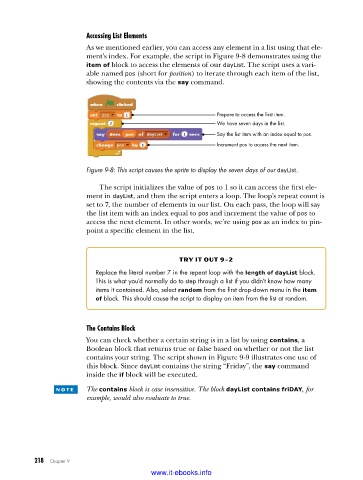
                         ment’s index. For example, the script in Figure 9-8 demonstrates using the
                         item of block to access the elements of our dayList. The script uses a vari-
                         able named pos (short for position) to iterate through each item of the list,
                         showing the contents via the say command.


                                                             Prepare to access the first item.
                                                             We have seven days in the list.
                                                             Say the list item with an index equal to pos.
                                                             Increment pos to access the next item.


                         Figure 9-8: This script causes the sprite to display the seven days of our dayList .

                             The script initializes the value of pos to 1 so it can access the first ele-
                         ment in dayList, and then the script enters a loop. The loop’s repeat count is
                         set to 7, the number of elements in our list. On each pass, the loop will say
                         the list item with an index equal to pos and increment the value of pos to
                         access the next element. In other words, we’re using pos as an index to pin-
                         point a specific element in the list.


                                                   try it out 9-2
                            Replace the literal number 7 in the repeat loop with the length of dayList block .
                            This is what you’d normally do to step through a list if you didn’t know how many
                            items it contained . Also, select random from the first drop-down menu in the item
                            of block . This should cause the script to display an item from the list at random .


                         The Contains Block
                         You can check whether a certain string is in a list by using contains, a
                         Boolean block that returns true or false based on whether or not the list
                         contains your string. The script shown in Figure 9-9 illustrates one use of
                         this block. Since dayList contains the string “Friday”, the say command
                         inside the if block will be executed.

                 n o t e  The contains block is case insensitive. The block dayList contains friDAY, for
                         example, would also evaluate to true.


           218   Chapter 9
                                           www.it-ebooks.info

