


Page 17 - Learn to Program - Basic-256
P. 17
Chapter 1: Meeting BASIC-256 – Say Hello.                                          Page 1


            Chapter 1: Meeting BASIC-256 – Say Hello.


                   This chapter will introduce the BASIC-256 environment using the print and
                   say statements. You will see the difference between commands you send to
                   the computer, strings of text, and numbers that will be used by the program.
                   We will also explore simple mathematics to show off just how talented your
                   computer is. Lastly you will learn what a syntax-error is and how to fix them.


            The BASIC-256 Window:


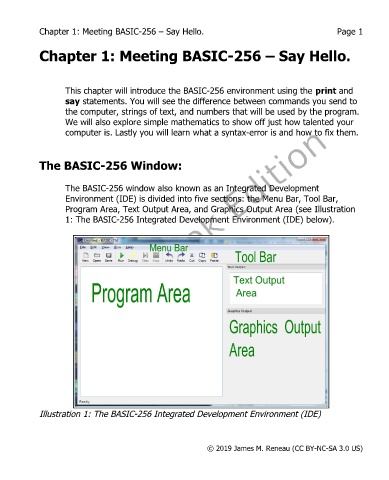
                   The BASIC-256 window also known as an Integrated Development
                   Environment (IDE) is divided into five sections: the Menu Bar, Tool Bar,
                   Program Area, Text Output Area, and Graphics Output Area (see Illustration
                   1: The BASIC-256 Integrated Development Environment (IDE) below).


            Illustration 1: The BASIC-256 Integrated Development Environment (IDE)


                                                           © 2019 James M. Reneau (CC BY-NC-SA 3.0 US)

