


Page 27 - Super Scratch Programming Adventure -2nd Edition
P. 27
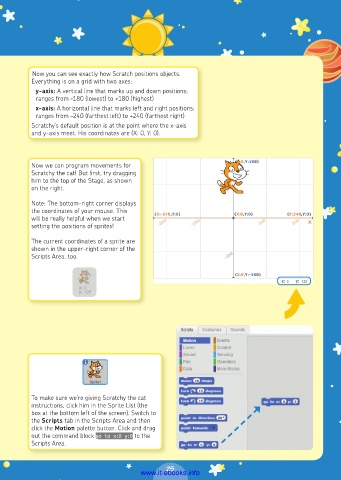
Now you can see exactly how Scratch positions objects.
          Everything is on a grid with two axes:
           y-axis: A vertical line that marks up and down positions;
           ranges from –180 (lowest) to +180 (highest)
           x-axis: A horizontal line that marks left and right positions;
           ranges from –240 (farthest left) to +240 (farthest right)
          Scratchy’s default position is at the point where the x-axis
          and y-axis meet. His coordinates are (X: 0, Y: 0).


          Now we can program movements for
          Scratchy the cat! But first, try dragging
          him to the top of the Stage, as shown
          on the right.

          Note: The bottom-right corner displays
          the coordinates of your mouse. This
          will be really helpful when we start
          setting the positions of sprites!
          The current coordinates of a sprite are
          shown in the upper-right corner of the
          Scripts Area, too.


          To make sure we’re giving Scratchy the cat
          instructions, click him in the Sprite List (the
          box at the bottom left of the screen). Switch to
          the Scripts tab in the Scripts Area and then
          click the Motion palette button. Click and drag
          out the command block go to x:0 y:0 to the
          Scripts Area.


                                                25
                                         www.it-ebooks.info

