


Page 28 - Super Scratch Programming Adventure -2nd Edition
P. 28
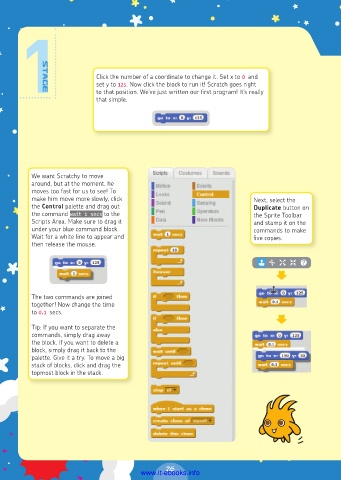
Click the number of a coordinate to change it. Set x to 0 and
                            set y to 125. Now click the block to run it! Scratch goes right
                            to that position. We’ve just written our first program! It’s really
                            that simple.


          We want Scratchy to move
          around, but at the moment, he
          moves too fast for us to see! To
          make him move more slowly, click                               Next, select the
          the Control palette and drag out                               Duplicate button on
          the command wait 1 secs to the                                 the Sprite Toolbar
          Scripts Area. Make sure to drag it                             and stamp it on the
          under your blue command block.                                 commands to make
          Wait for a white line to appear and                            five copies.
          then release the mouse.


          The two commands are joined
          together! Now change the time
          to 0.1 secs.

          Tip: If you want to separate the
          commands, simply drag away
          the block. If you want to delete a
          block, simply drag it back to the
          palette. Give it a try. To move a big
          stack of blocks, click and drag the
          topmost block in the stack.


                                                26
                                         www.it-ebooks.info

