


Page 29 - Super Scratch Programming Adventure -2nd Edition
P. 29
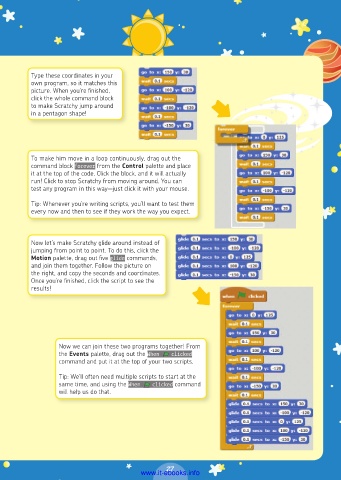
Type these coordinates in your
          own program, so it matches this
          picture. When you’re finished,
          click the whole command block
          to make Scratchy jump around
          in a pentagon shape!


          To make him move in a loop continuously, drag out the
          command block forever from the Control palette and place
          it at the top of the code. Click the block, and it will actually
          run! Click to stop Scratchy from moving around. You can
          test any program in this way—just click it with your mouse.

          Tip: Whenever you’re writing scripts, you’ll want to test them
          every now and then to see if they work the way you expect.


          Now let’s make Scratchy glide around instead of
          jumping from point to point. To do this, click the
          Motion palette, drag out five glide commands,
          and join them together. Follow the picture on
          the right, and copy the seconds and coordinates.
          Once you’re finished, click the script to see the
          results!


                  Now we can join these two programs together! From
                  the Events palette, drag out the When    clicked
                  command and put it at the top of your two scripts.
                  Tip: We’ll often need multiple scripts to start at the
                  same time, and using the When    clicked command
                  will help us do that.


                                                27
                                         www.it-ebooks.info

