


Page 123 - Scratch Programming Playground
P. 123
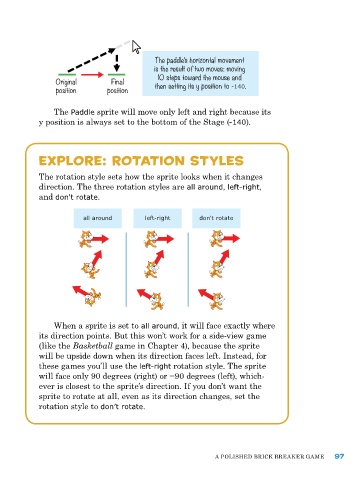
The paddle’s horizontal movement
                                            is the result of two moves: moving
                                             10 steps toward the mouse and
                Original        Final       then setting its y position to -140.
                position       position


                The Paddle sprite will move only left and right because its
            y position is always set to the bottom of the Stage (-140).


            explore: rotation styles


            The rotation style sets how the sprite looks when it changes
            direction. The three rotation styles are all around, left-right,
            and don't rotate.

                        all around       left-right     don't rotate


                When a sprite is set to all around, it will face exactly where
            its direction points. But this won’t work for a side-view game
            (like the Basketball game in Chapter 4), because the sprite
            will be upside down when its direction faces left. Instead, for
            these games you’ll use the left-right rotation style. The sprite
            will face only 90 degrees (right) or −90 degrees (left), which-
            ever is closest to the sprite’s direction. If you don’t want the
            sprite to rotate at all, even as its direction changes, set the
            rotation style to don’t rotate.


                                                             a poLIShed BrICk Breaker Game    97

