


Page 124 - Scratch Programming Playground
P. 124
Because we’re changing the Paddle sprite’s direction, we
                         also need to set the sprite’s rotation style with the set rotation
                         style block. The Paddle sprite is programmed to face and move
                         toward the mouse, but we want the sprite to always look flat
                         and horizontal, so the rotation style is set to don’t rotate.


                         save Point

                         Click the green flag to test the code so far. move the mouse
                         around and see if the Paddle sprite follows it. make sure the
                         Paddle stays at the bottom of the Stage. Then click the red stop
                         sign and save your program.


                                 make a Ball that Bounces
                           B     off the Walls


                         The Scratch Sprite Library has several sprites you could use
                         for the ball, but let’s use the Tennis Ball sprite for this game.

                         2. Create the Tennis Ball Sprite

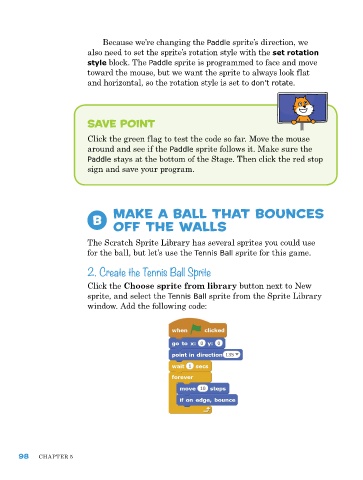
                         Click the Choose sprite from library button next to New
                         sprite, and select the Tennis Ball sprite from the Sprite Library
                         window. add the following code:


      98    ChapTer 5

