


Page 127 - Scratch Programming Playground
P. 127
save Point


            Click the green flag to test the code so far. make sure the ten-
            nis ball bounces off the paddle. Then click the red stop sign
            and save your program.


            explore: cloning

            The create clone of myself block makes a duplicate of the
            sprite, which is called a clone. This feature is handy whenever
            you want to create many copies of an object in your game, such
            as a lot of bad guys that look the same, a bunch of coins for the
            player to collect, or in the Brick Breaker game, the bricks you
            need to hit.
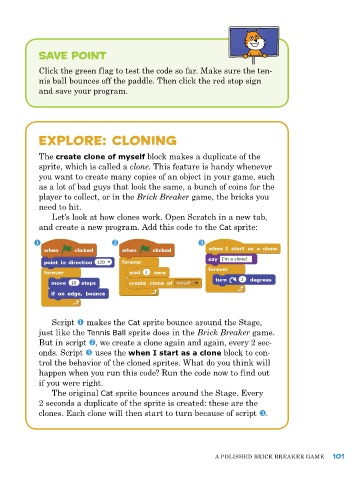
               Let’s look at how clones work. open Scratch in a new tab,
            and create a new program. add this code to the Cat sprite:


               Script u makes the Cat sprite bounce around the Stage,
            just like the Tennis Ball sprite does in the Brick Breaker game.
            But in script v, we create a clone again and again, every 2 sec-
            onds. Script w uses the when I start as a clone block to con-
            trol the behavior of the cloned sprites. What do you think will
            happen when you run this code? run the code now to find out
            if you were right.
               The original Cat sprite bounces around the Stage. every
            2 seconds a duplicate of the sprite is created: these are the
            clones. each clone will then start to turn because of script w.


                                                             a poLIShed BrICk Breaker Game   101

