


Page 132 - Scratch Programming Playground
P. 132
The game over broadcast will tell the Game Over sprite to
                         appear. Let’s create the sprite next.

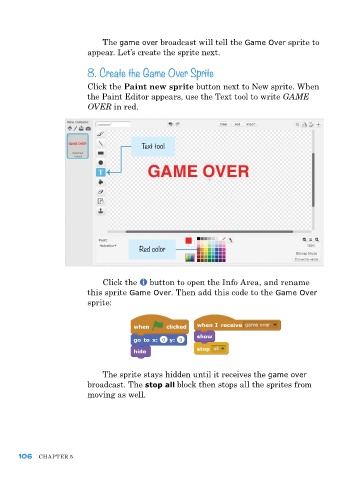
                         8. Create the Game Over Sprite

                         Click the Paint new sprite button next to New sprite. When
                         the paint editor appears, use the Text tool to write GAME
                         OVER in red.


                                        Text tool


                                        Red color


                             Click the   button to open the Info area, and rename
                         this sprite Game Over. Then add this code to the Game Over
                         sprite:


                             The sprite stays hidden until it receives the game over
                         broadcast. The stop all block then stops all the sprites from
                         moving as well.


      106   ChapTer 5

