


Page 162 - Scratch Programming Playground
P. 162
Using the touching color? block, the first if loop tests for
                         the condition when the snake touches its own body: make sure
                         you use the color you used in costume2 for this condition. The
                         next two if statements test the horizontal and vertical bound-
                         aries of the Stage. When the snake crosses them, the same
                         game over broadcast is sent. Let’s hope the player is quick
                         enough to avoid crashing; otherwise, that snake is hiss-tory!
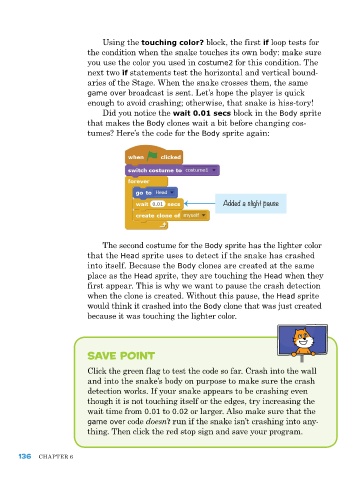
                             Did you notice the wait 0.01 secs block in the Body sprite
                         that makes the Body clones wait a bit before changing cos-
                         tumes? here’s the code for the Body sprite again:


                                                               Added a slight pause


                             The second costume for the Body sprite has the lighter color
                         that the Head sprite uses to detect if the snake has crashed
                         into itself. Because the Body clones are created at the same
                         place as the Head sprite, they are touching the Head when they
                         first appear. This is why we want to pause the crash detection
                         when the clone is created. Without this pause, the Head sprite
                         would think it crashed into the Body clone that was just created
                         because it was touching the lighter color.


                         Save Point


                         Click the green flag to test the code so far. Crash into the wall
                         and into the snake’s body on purpose to make sure the crash
                         detection works. If your snake appears to be crashing even
                         though it is not touching itself or the edges, try increasing the
                         wait time from 0.01 to 0.02 or larger. also make sure that the
                         game over code doesn’t run if the snake isn’t crashing into any-
                         thing. Then click the red stop sign and save your program.


      136   ChapTer 6

