


Page 157 - Scratch Programming Playground
P. 157
B     Make apples appear


            The basics of moving the snake around are done, so let’s add
            the apple the snake will try to eat.
            2. Add the Apple Sprite

            Click the Choose sprite from library button next to new
            sprite, and select the Apple sprite from the Sprite Library. add
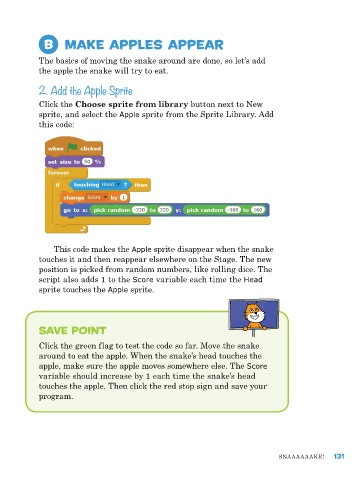
            this code:


                This code makes the Apple sprite disappear when the snake
            touches it and then reappear elsewhere on the Stage. The new
            position is picked from random numbers, like rolling dice. The
            script also adds 1 to the Score variable each time the Head
            sprite touches the Apple sprite.


            Save Point

            Click the green flag to test the code so far. Move the snake
            around to eat the apple. When the snake’s head touches the
            apple, make sure the apple moves somewhere else. The Score
            variable should increase by 1 each time the snake’s head
            touches the apple. Then click the red stop sign and save your
            program.


                                                                              Snaaaaaake!     131

