


Page 159 - Scratch Programming Playground
P. 159
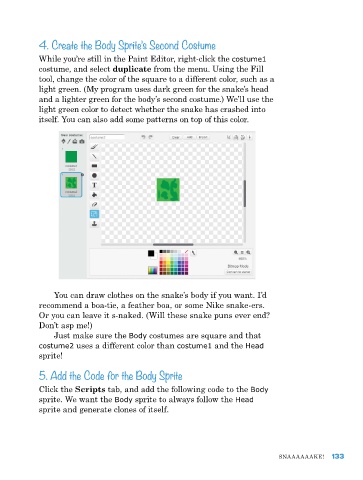
4. Create the Body Sprite’s Second Costume


            While you’re still in the paint editor, right-click the costume1
            costume, and select duplicate from the menu. Using the Fill
            tool, change the color of the square to a different color, such as a
            light green. (My program uses dark green for the snake’s head
            and a lighter green for the body’s second costume.) We’ll use the
            light green color to detect whether the snake has crashed into
            itself. You can also add some patterns on top of this color.


                You can draw clothes on the snake’s body if you want. I’d
            recommend a boa-tie, a feather boa, or some nike snake-ers.
            Or you can leave it s-naked. (Will these snake puns ever end?
            Don’t asp me!)
                Just make sure the Body costumes are square and that
            costume2 uses a different color than costume1 and the Head
            sprite!

            5. Add the Code for the Body Sprite

            Click the Scripts tab, and add the following code to the Body
            sprite. We want the Body sprite to always follow the Head
            sprite and generate clones of itself.


                                                                              Snaaaaaake!    133

