


Page 239 - Scratch Programming Playground
P. 239
Brush tool
                                    Line tool


                                  Line width slider


                open the sprite’s Info area and rename the sprite Ground.
            also, rename the Sprite1 sprite Cat.
            2. Add the Gravity and Landing Code


            Now that we have a sprite for the ground, we need the cat to
            fall and land on it.
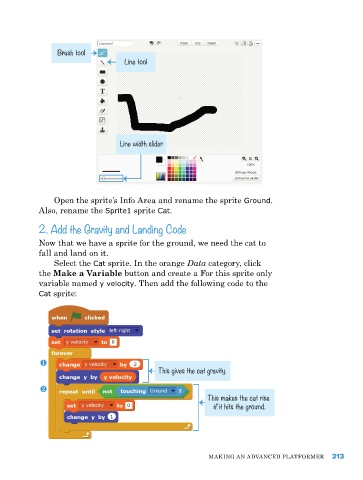
                Select the Cat sprite. In the orange Data category, click
            the Make a Variable button and create a for this sprite only
            variable named y velocity. then add the following code to the
            Cat sprite:


                                             This gives the cat gravity.


                                                           This makes the cat rise
                                                            if it hits the ground.


                                                           MakING aN advaNCed pLatforMer     213

