


Page 241 - Scratch Programming Playground
P. 241
Save Point

            Click the green flag to test the code so far. drag the cat up
            with the mouse and let go. Make sure the cat falls and sinks
            into the ground a bit and then slowly lifts out of it. then click
            the red stop sign and save your program.


            3. Make the Cat Walk and Wrap Around the Stage

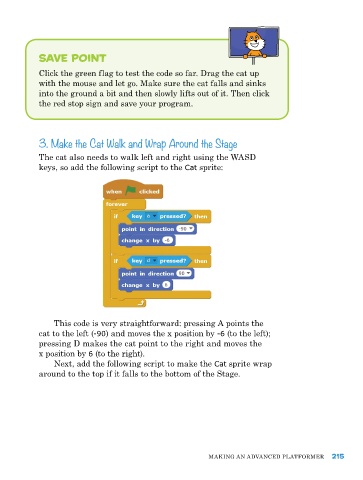
            the cat also needs to walk left and right using the WaSd
            keys, so add the following script to the Cat sprite:


                this code is very straightforward: pressing a points the
            cat to the left (-90) and moves the x position by -6 (to the left);
            pressing d makes the cat point to the right and moves the
            x position by 6 (to the right).
                Next, add the following script to make the Cat sprite wrap
            around to the top if it falls to the bottom of the Stage.


                                                           MakING aN advaNCed pLatforMer     215

