


Page 268 - Scratch Programming Playground
P. 268
ghost effect to 100, and the Ground costume and backdrop will
                         line up. the backdrop shows what the level looks like, while
                         the Ground sprite acts as its hitbox.


                         Save Point

                         Click the green flag to test the code so far. Make sure you can
                         move the cat all around the Stage. then click the red stop sign
                         and save your program.


                         16. Add More Wrap-Around Code to the Cat Sprite

                         Notice that the level has a couple floating platforms and a
                         hill with a pit in the middle. When the cat falls down the pit,
                         it wraps around the Stage and reappears at the top. Let’s add
                         wrap-around code for the left and right edges of the Stage as
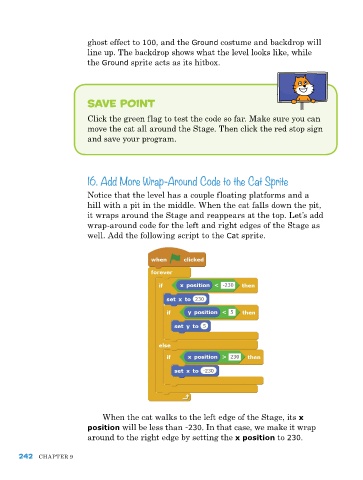
                         well. add the following script to the Cat sprite.


                             When the cat walks to the left edge of the Stage, its x
                         position will be less than -230. In that case, we make it wrap
                         around to the right edge by setting the x position to 230.


      242   Chapter 9

