


Page 28 - Scratch Programming Playground
P. 28
Scratch is a free programming environment
                         that runs in your web browser. It was designed
                         by the MIt Media Lab’s Lifelong Kindergarten
                         Group. Scratch users, called Scratchers, can
                         create programs by snapping together code
                         blocks in the Scratch editor. although Scratch
                         was designed for 8- to 16-year-olds, Scratchers
                         consist of people of all ages, including younger
                         children with their parents. the software makes
                         it easy for anyone to start developing their pro-
                         gramming and problem-solving skills.
                             Because Scratch runs in your web browser, there’s no
                         software to install. It’s impossible for a Scratch program to
                         damage the files on your computer. Scratch is completely
                         free—there are no ads or in-app purchases, so kids can play
                         with everything on the Scratch site and adults don’t have to
                         worry about accidental charges.
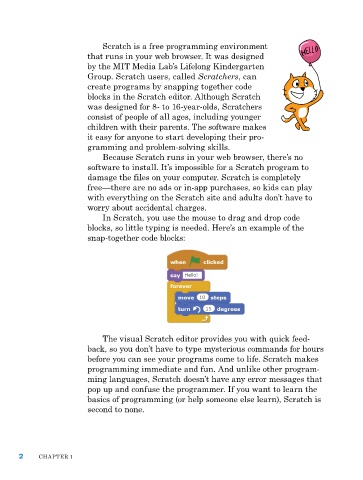
                             In Scratch, you use the mouse to drag and drop code
                         blocks, so little typing is needed. here’s an example of the
                         snap-together code blocks:


                             the visual Scratch editor provides you with quick feed-
                         back, so you don’t have to type mysterious commands for hours
                         before you can see your programs come to life. Scratch makes
                         programming immediate and fun. and unlike other program-
                         ming languages, Scratch doesn’t have any error messages that
                         pop up and confuse the programmer. If you want to learn the
                         basics of programming (or help someone else learn), Scratch is
                         second to none.


      2     Chapter 1

